
Download WouldjaDraw – Advanced Drawing Made Easy for Mac
Overview
WouldjaDraw is a lightweight yet powerful drawing application designed specifically for Mac OS X users who need a fast, intuitive tool for creating vector‑based illustrations, layout mock‑ups, and quick sketches. First released in 2006, the software has evolved through several updates, the latest being version 1.3 released on 1 May 2010. The trial version offers a generous set of features without demanding large amounts of disk space, making it an attractive option for designers, students, and hobbyists alike.
Its popularity in Germany and the United Kingdom reflects a strong community of users who appreciate its simplicity and reliable performance on older Mac hardware. Whether you are preparing a printable flyer, drafting a UI wireframe, or simply doodling ideas, WouldjaDraw delivers a responsive canvas with a minimal learning curve. The program supports both 32‑bit and, thanks to the recent 64‑bit update, 64‑bit architectures on Mac OS X 10.6 “Snow Leopard” and earlier versions.
As a trial, it allows you to explore its core tools before deciding on a full license, and the free download is secured through HTTPS to protect your system from tampering.
Key Features
- Intuitive vector drawing engine with smooth Bézier curves.
- Layer‑based workflow allowing unlimited stacking and grouping.
- Extensive library of pre‑built shapes, icons, and brushes.
- Precision alignment tools, including snap‑to‑grid and smart guides.
- Export options for PNG, JPEG, PDF, and SVG formats.
- Support for 64‑bit processing on Mac OS X 10.6 and later.
- Customizable keyboard shortcuts for faster workflow.
- Integrated color palette with CMYK and RGB modes.
- Ability to import and edit existing Adobe Illustrator files.
- Lightweight installer – less than 25 MB of storage required.
Installation, Usage & Compatibility
Step‑by‑Step Installation
- Visit the official WouldjaDraw download page and click the “Download Trial” button.
- Save the .dmg file to your Downloads folder; the file size is under 25 MB.
- Open the .dmg and drag the WouldjaDraw icon into your Applications folder.
- Launch the application; macOS may prompt you to confirm that the app is from an identified developer—click “Open”.
- The trial will activate automatically, giving you 14 days of full‑feature access.
Getting Started Quickly
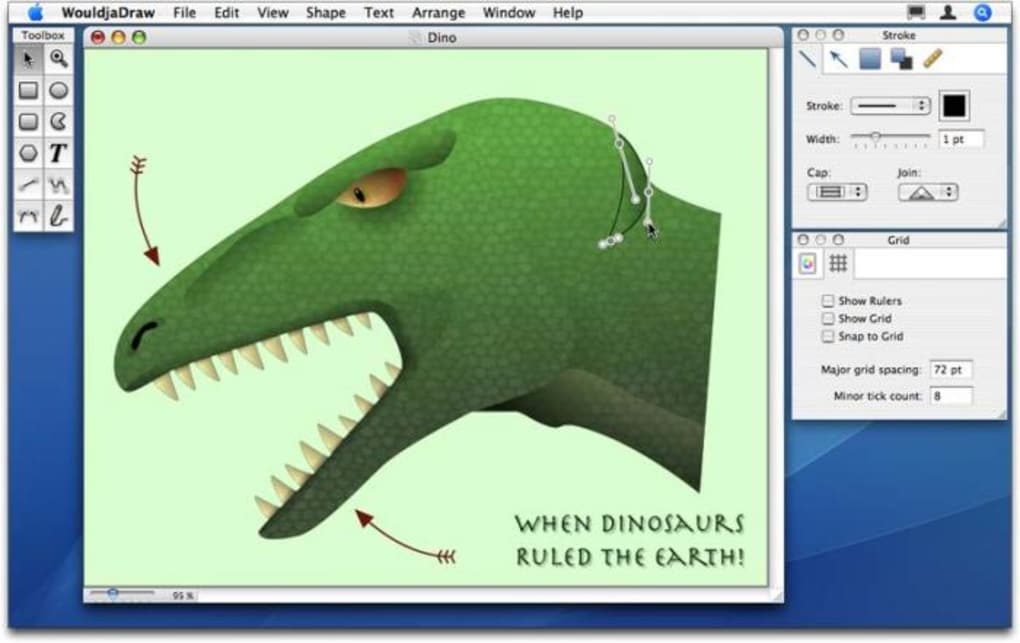
Once opened, the clean workspace presents a toolbar on the left with drawing, shape, and text tools. The central canvas supports unlimited zoom, and the right‑hand panel displays layer controls and property settings. Begin by creating a new document (File → New) and select a preset size or define a custom dimension.
Use the “Pen” tool for free‑form paths, or click on any pre‑loaded shape to add it instantly. Adjust colors via the integrated palette, and employ the alignment guides to keep elements tidy. When you’re satisfied, export your artwork through File → Export, choosing the appropriate format for your project.
System Requirements
WouldjaDraw runs on Mac OS X 10.4 Tiger through 10.6 Snow Leopard. The recent 64‑bit update ensures smooth performance on newer Intel‑based Macs while still supporting older PowerPC machines in 32‑bit mode. Minimum RAM requirement is 512 MB, though 1 GB is recommended for handling large, multi‑layer documents. No additional runtime libraries are needed, as the installer bundles all necessary components.
Pros, Cons, FAQ & Conclusion
Pros
- Very low storage footprint – ideal for older Macs.
- Fast, responsive UI even with complex vector work.
- Comprehensive export options including SVG for web use.
- Free trial provides full feature set for evaluation.
- 64‑bit support improves stability on newer hardware.
Cons
- Interface looks dated compared to modern design apps.
- No native support for Windows, iOS, or Android platforms.
- Lacks advanced photo‑editing tools found in Adobe suite.
- Trial period is limited; full version requires purchase.
- Documentation is basic and may require community support.
Frequently Asked Questions
Is the trial version of WouldjaDraw fully functional?
Yes, the 14‑day trial unlocks all drawing tools, layer management, and export formats, allowing you to test the software without restrictions.
Can I import Adobe Illustrator files?
WouldjaDraw can open .ai files saved with PDF compatibility; complex effects may be rasterized, but most vector data is preserved.
Does the app support retina displays?
The 64‑bit version renders crisp graphics on Retina screens, offering high‑resolution previews and exports.
What is the price for the full version?
The full license costs $29.99 USD, a one‑time payment that includes future minor updates.
Is there any customer support available?
Support is provided via email and a community forum; response times are typically within 48 hours.
Conclusion & Call to Action
WouldjaDraw remains a solid choice for Mac users who need a fast, affordable drawing solution without the bloat of larger suites. Its lightweight design, 64‑bit compatibility, and generous trial period make it especially appealing for students and freelance designers on a budget. While the UI may feel a bit vintage and the platform is limited to macOS, the core functionality holds up well for everyday vector work. If you’re looking for a secure, easy‑to‑install app that lets you create professional‑grade illustrations without draining your hard drive, download the trial today and experience the simplicity of WouldjaDraw first‑hand.
Download WouldjaDraw now and start drawing with confidence!







